Black Friday 2026 Support Playbook: Get Your Ecommerce Chatbot Ready in 7 Days
Prepare Your Ecommerce Chatbot for Black Friday and Cyber Monday
Oct 30, 2026
5 mins
Discover what to monitor during Cyber Week and avoid common mistakes that lead to poor customer experiences, missed sales, and overwhelmed support teams.
Why this Black Friday is different
Adobe forecasts that US shoppers will spend a record $275.1 billion online between 1 November and 31 December 2026, up 6.7% on last year. Cyber Week, from Thanksgiving to Cyber Monday, carries a large share of it:
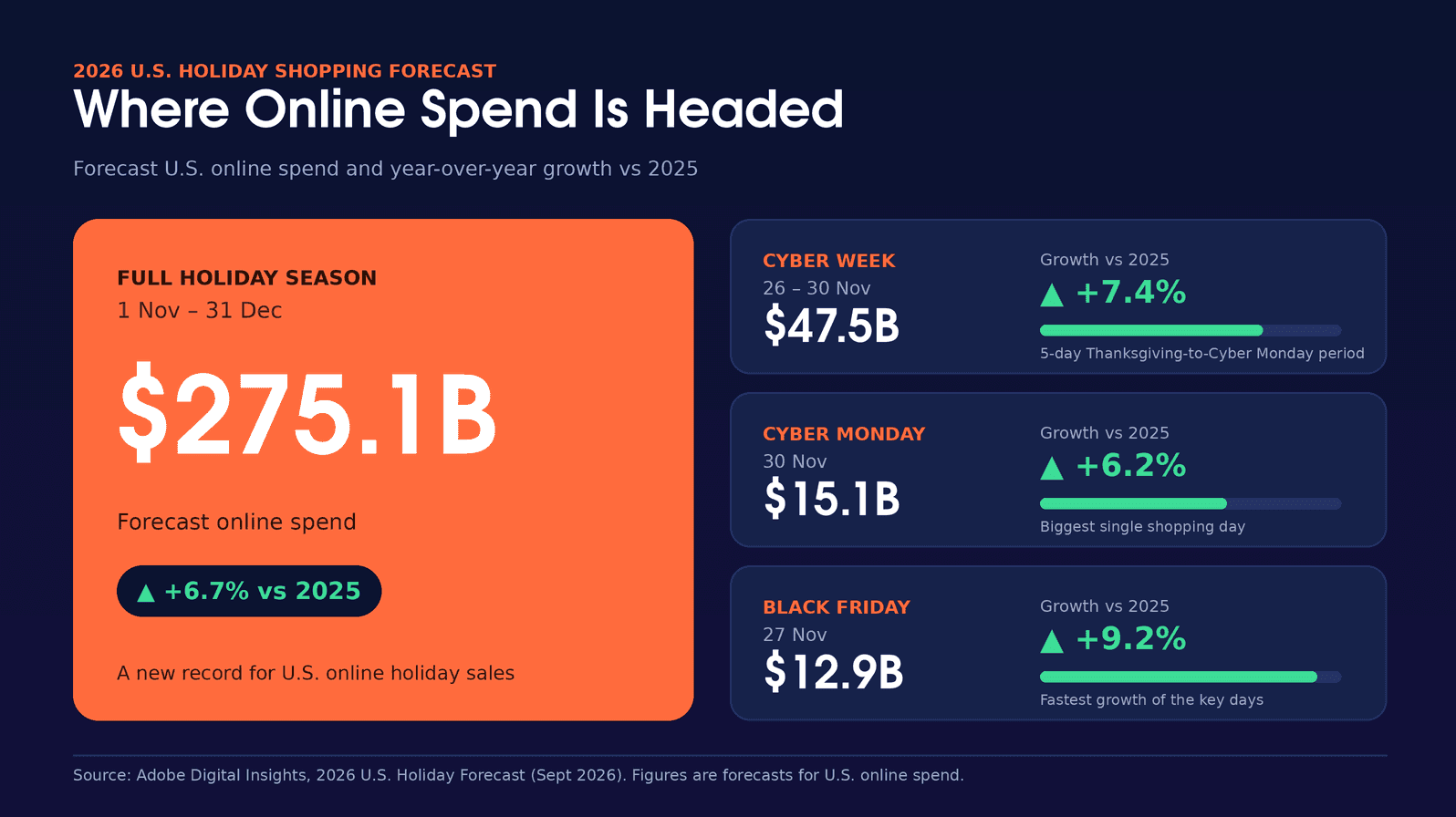
Black Friday is the fastest-growing day. Source: Adobe Digital Insights 2026 holiday forecast, published 28 September 2026. These are forecasts, not results.
More sales means more questions. Shoppers ask about stock, delivery dates, discount codes and returns, often at midnight and mostly on their phones. Adobe also forecasts that traffic to retail sites from AI services will grow 130% year over year. Many of those visitors arrive with a specific question already in mind.
Zendesk's CX Trends 2026 report found that 74% of consumers expect customer service to be available 24/7. A support inbox that closes at 6 pm will not meet that expectation on the busiest weekend of the year.
The good news is that you still have time. Cyber Week begins on 26 November. Here is a 7-day plan you can start this week.
The 7-day readiness plan
Day 1: Pull last year's questions
Export your support tickets and chat logs from last November. Group them into themes: delivery times, order status, discount codes, sizing, stock, returns and payment. The top five themes will cover most of your peak traffic. This list drives every other step.
Day 2: Check your catalog and stock sync
A chatbot that recommends an item that sold out an hour ago does more harm than having no chatbot. Confirm that product data, variants, prices and availability sync correctly from your store. ELX Chatbot connects to your product inventory so recommendations reflect what you actually sell. Spot-check ten products, including your most discounted ones.
Day 3: Load your peak-season policies
Update the answers that change every November:
- Last order dates for standard and express delivery
- Extended holiday return windows
- How discount codes work, and whether they stack
- Any items excluded from promotions
If your policies live on web pages, you can point the chatbot at your FAQ links so it learns from them. Then read the answers it gives back and correct any that are out of date.
Day 4: Connect order tracking
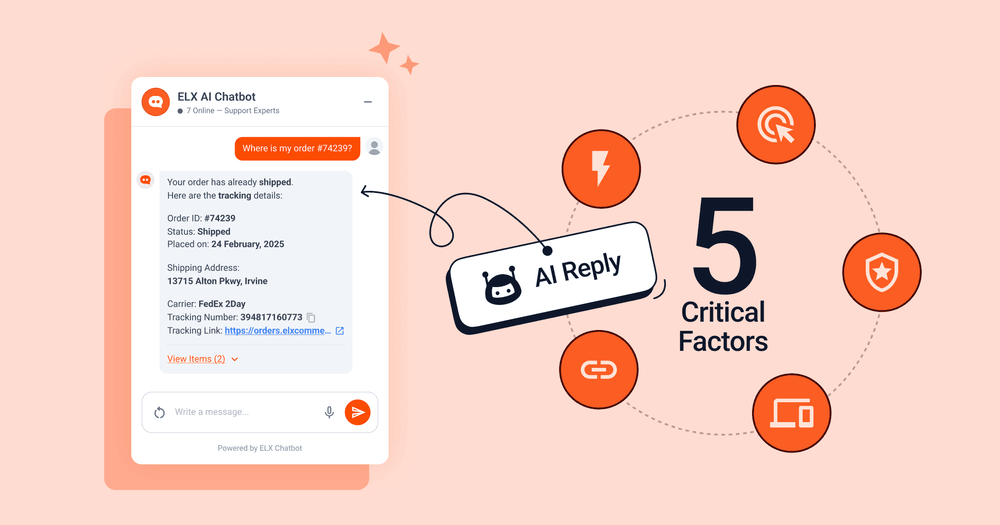
"Where is my order?" will be one of your biggest question types in the weeks after Cyber Week. Make sure order status lookups work for a real test order, and that the answer includes the tracking link and the expected delivery date.
Day 5: Set your handoff rules and staffing
Decide which conversations a person should take: high-value baskets, upset customers, payment problems and anything the chatbot cannot answer confidently. Then check that your team knows how live handoff works and who is covering which hours. Gorgias' 2026 research found that 53% of ecommerce brands use a mix of AI and human agents for high-value orders, so a clean handoff matters as much as the AI itself.
Day 6: Test with messy, real questions
Do not test with polished questions. Ask the way shoppers do: "is this in stock in a 10?", "will it arrive before Christmas", "code not working". Test on a phone, because Adobe forecasts that 57.4% of season spend will happen on mobile. Ask your team to try to break it, and fix what they find.
Day 7: Go live and set up monitoring
Switch on your peak-season setup and open the analytics dashboard. Decide who checks it, and when. During Cyber Week, review it at least twice a day.
What to monitor during Cyber Week
Track a small set of numbers and avoid drowning in charts:
Questions the chatbot could not answer. These are your fastest wins. Add the missing answer the same day. Handoff volume by hour. It shows when your team needs more cover. Conversion for chat sessions versus non-chat sessions. Compare the two on the same days so seasonal effects cancel out. Average order value for chat sessions. It shows whether recommendations help shoppers add the right items.
Five mistakes to avoid
- Launching on Black Friday morning. Go live a week earlier so you have time to fix problems.
- Leaving last year's policies in place. Out-of-date return windows cause refunds and complaints.
- Hiding the human option. Shoppers with a complicated problem should reach a person quickly.
- Ignoring mobile. Most of your shoppers will be on a phone.
- Not looking at the data until January. Peak season rewards daily adjustments.
The bottom line
Black Friday rewards stores that answer questions quickly and accurately. A prepared chatbot handles repetitive questions, so your team can focus on the conversations that need a person.
Ready to get set up before Cyber Week? We are just one click away!
Sources:
Adobe: U.S. holiday shopping season to hit record $275.1 billion online (press release, 28 September 2026)
Adobe Digital Insights: 2026 U.S. holiday forecast (PDF)
Digital Commerce 360: Adobe projection: 2026 online holiday sales to reach $275.1 billion (AI traffic and mobile share)
Zendesk: CX Trends 2026 press release
Gorgias: The State of Conversational Commerce in 2026 and Trend 5: AI and human agents
More Blogs
Explore more insights, tips, and stories from our team.